What makes a test meaningful? How can tests shape better architecture? And what roles do humans and AI play?
A few years ago I made a comment in a code review about a test description. That simple remark evolved into a few days’ debate that included architecture, code smells and other cool terms.
How is it that a simple test description, that most people tend to just sprinkle (or worse – let AI write for them) can give rise to an “all important” software architecture and design debate? Read on to find out.
(Note: Examples are in flutter, but they convey a general idea that can be translated to any language. If there will be a demand I can easily “translate” this to JavaScript/Python/Rust/{holy grail language})
Table of Contents
A simple case
Let’s say we have a Card widget that displays text, and we are using it to display certain text in our app.
Our test is simple, right?
testWidgets(‘should display “mock_first” text’)
And how do we test it? A simple way to do it would be like this: Find the widget by text and expect it to appear in a single widget only:
<div itemprop="text"
  class="Box-body p-0 blob-wrapper data type-dart  "
  style="overflow: auto" tabindex="0" role="region"
  aria-label="first_test.dart content, created by YonatanKra on 08:29AM on September 09, 2025."
>
| testWidgets(‘should display “mock_first” text’, (WidgetTester tester) async { | |
| await tester.pumpWidget( | |
| ChangeNotifierProvider<MyAppState>( | |
| create: (context) => MockAppState(), | |
| child: MaterialApp(home: MyHomePage()), | |
| ), | |
| ); | |
| expect(find.text(‘mock_first’), findsOneWidget); | |
| }); |
</div> </div>
<div class="gist-meta">
<a href="https://gist.github.com/YonatanKra/9984e00f79661cadf56348989b11c5c6/raw/3a908ae684cf037b1e3583c37761bcb0ee3cade1/first_test.dart" style="float:right" class="Link--inTextBlock" target="_blank" rel="noopener">view raw</a>
<a href="https://gist.github.com/YonatanKra/9984e00f79661cadf56348989b11c5c6#file-first_test-dart" class="Link--inTextBlock" target="_blank" rel="noopener">
first_test.dart
</a>
hosted with ❤ by <a class="Link--inTextBlock" href="https://github.com" target="_blank" rel="noopener">GitHub</a>
</div>
</div>On the other hand, one can be more specific in the specifics:
testWidgets(‘should display “mock_first” in a big card’)
This is way more specific and assumes much about the widget-in-test. First, we know there’s a BigCard in it and that the text should be inside that card. Here’s how that test looks like:
<div itemprop="text"
  class="Box-body p-0 blob-wrapper data type-dart  "
  style="overflow: auto" tabindex="0" role="region"
  aria-label="second_test.dart content, created by YonatanKra on 08:31AM on September 09, 2025."
>
| testWidgets('should display “mock_first” in a big card', ( WidgetTester tester, ) async { | |
| await tester.pumpWidget( | |
| ChangeNotifierProvider<MyAppState>( | |
| create: (context) => MockAppState(), | |
| child: MaterialApp(home: MyHomePage()), | |
| ), | |
| ); | |
| expect(getBigCardText(tester), equals('mock_first')); | |
| }); | |
| } |
</div> </div>
<div class="gist-meta">
<a href="https://gist.github.com/YonatanKra/c6da689f410118cb7a63deba2d0cd86f/raw/c6c4bdd6f2cead370baa3649fd6bb6ebfba321bb/second_test.dart" style="float:right" class="Link--inTextBlock" target="_blank" rel="noopener">view raw</a>
<a href="https://gist.github.com/YonatanKra/c6da689f410118cb7a63deba2d0cd86f#file-second_test-dart" class="Link--inTextBlock" target="_blank" rel="noopener">
second_test.dart
</a>
hosted with ❤ by <a class="Link--inTextBlock" href="https://github.com" target="_blank" rel="noopener">GitHub</a>
</div>
</div>Both tests have a similar boilerplate (the pumpWidget) part. At first glance they seem to test the same thing – verify “mock_first” appears on screen.
Even so, we can learn important principles from the nuances.
Specificity
In the first example we look for the wanted text and verify it appears only once (in a single widget): expect(find.text(‘mock_first’), findsOneWidget);. We do not care what widget or how the widgets are arranged – we just make sure it appears only once in the page.
In the second example, we are more specific: expect(getBigCardText(tester), equals(‘mock_first’));. We specifically look for the big card and extract the text out of it.
As opposed to the more general approach in the first example, this implies that the card is part of the interface. The developer expects to have a “big card” with the wanted text inside.
If, for some reason, we change the implementation not to use a card, that would be considered an interface change and the test will fail.
The developer who writes the widget must convey through the test if one meant to set the big card specifically as part of the interface or leave the interface more general.
Coupling (and the Human Hubris)
The developer should also be aware of coupling. Notice that “magic” function in the second test? getBigCardText?
Let’s dive inside:
<div itemprop="text"
  class="Box-body p-0 blob-wrapper data type-dart  "
  style="overflow: auto" tabindex="0" role="region"
  aria-label="getBigCardText.dart content, created by YonatanKra on 08:32AM on September 09, 2025."
>
| String? getBigCardText(WidgetTester tester) { | |
| final bigCard = find.byType(BigCard); | |
| // Find the Text widget inside the BigCard | |
| final textWidget = find.descendant( | |
| of: bigCard, | |
| matching: find.byType(Text), | |
| ); | |
| // Get the actual text content from the rendered widget | |
| final textWidgetInstance = tester.widget<Text>(textWidget); | |
| return textWidgetInstance.data; | |
| } |
</div> </div>
<div class="gist-meta">
<a href="https://gist.github.com/YonatanKra/0d240d70e05568678ccb1586607ef882/raw/e36ccf297f3985507a7283f8370853dcb1aea29d/getBigCardText.dart" style="float:right" class="Link--inTextBlock" target="_blank" rel="noopener">view raw</a>
<a href="https://gist.github.com/YonatanKra/0d240d70e05568678ccb1586607ef882#file-getbigcardtext-dart" class="Link--inTextBlock" target="_blank" rel="noopener">
getBigCardText.dart
</a>
hosted with ❤ by <a class="Link--inTextBlock" href="https://github.com" target="_blank" rel="noopener">GitHub</a>
</div>
</div>See that it is looking for BigCard? This function is coupled to the BigCard widget. It is good practice to extract such parts to their own utility functions. This way, we can change it in one place if we decide to replace BigCard at some point.
This helper function also signals that our widget is now coupled to the BigCard.
Do we want to couple them? Or do we want to decouple them using some design pattern? Maybe create a facade that allows our widget to use the BigCard without knowing it is using it? Or would dependency injection be more relevant in this case?
It is an architecture/design decision that arises from the test – without even looking at the implementation itself.
Moreover, the implementation itself might not even exist when we write the test. Why is that important?
We tend to fall in love with our implementation. That’s where hubris creeps in.
Not only that, a survey conducted by JetBrains supports this claim, showing that developers are often reluctant to refactor.
Another study found that code smells (such as coupling) are not the main motivators for refactoring. Instead, the introduction of new features is what usually drives it.
It is clear from the research it is harder for developers to change the design after it is written. You can call it Hubris, you can call it sunk cost, but the fact is it is there and shown in multiple studies.
Using tests to find code smells can help. Writing the tests before implementation would surely improve the chances of thinking about the architecture before committing to one we fall in love with.
Clearer Feedback
There’s also a difference in the feedback we receive from a failed test.
The first test returns:
| The following TestFailure was thrown running a test: Expected: exactly one matching candidate Actual: _TextWidgetFinder:<Found 0 widgets with text “mock_first”: []> Which: means none were found but one was expected |
The second returns:
| The following TestFailure was thrown running a test: Expected: ‘mock_first’ Actual: ‘mock_first mock’ Which: is different. Both strings start the same, but the actual value also has the following trailing characters: mock |
We can see that in flutter, the way we test and the matchers we use reflect in the tests feedback. The feedback looks exactly what we wanted to do in each test in (kinda) plain english.
It’s not so different in other languages:
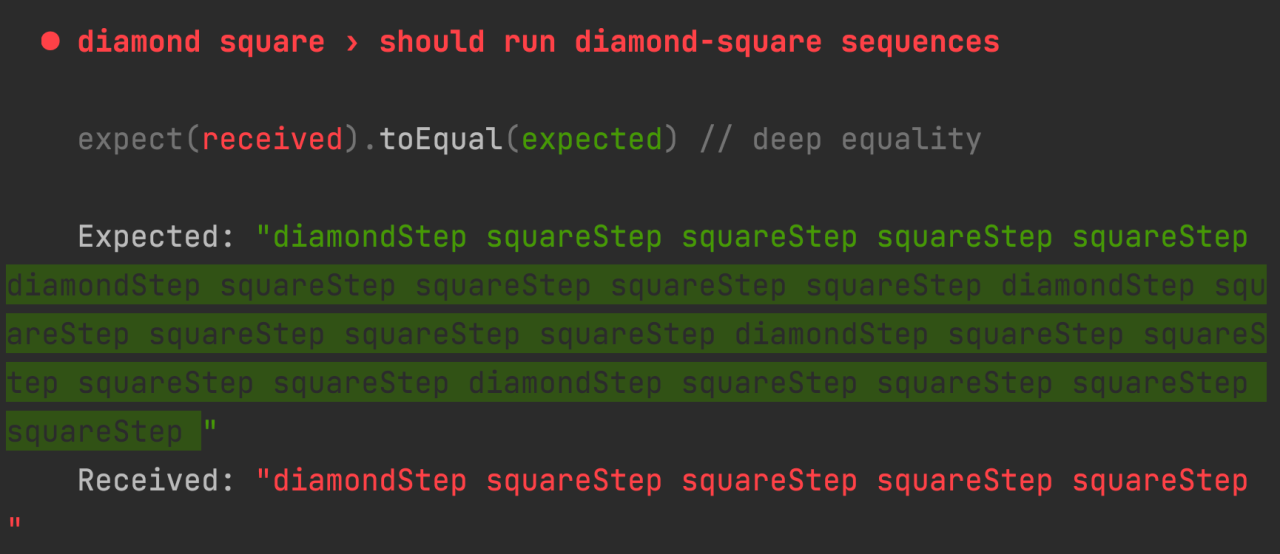
In this JavaScript test feedback (taken from this article), the expected vs. the received is quite obvious.
So the way we write the tests also affects how useful the feedback is.
AI
We mentioned human hubris. Can we trust AI to avoid such mistakes?
Here are my thoughts right now on the state-of-AI in software development: it is a very good, very fast, copy-paster of code. So the more examples it has of a way to solve a problem, the more likely it will use it.
It has a huge dataset to learn from, and it is as good as we are as humanity.
And this is how humanity ranges (according to surveys and data):
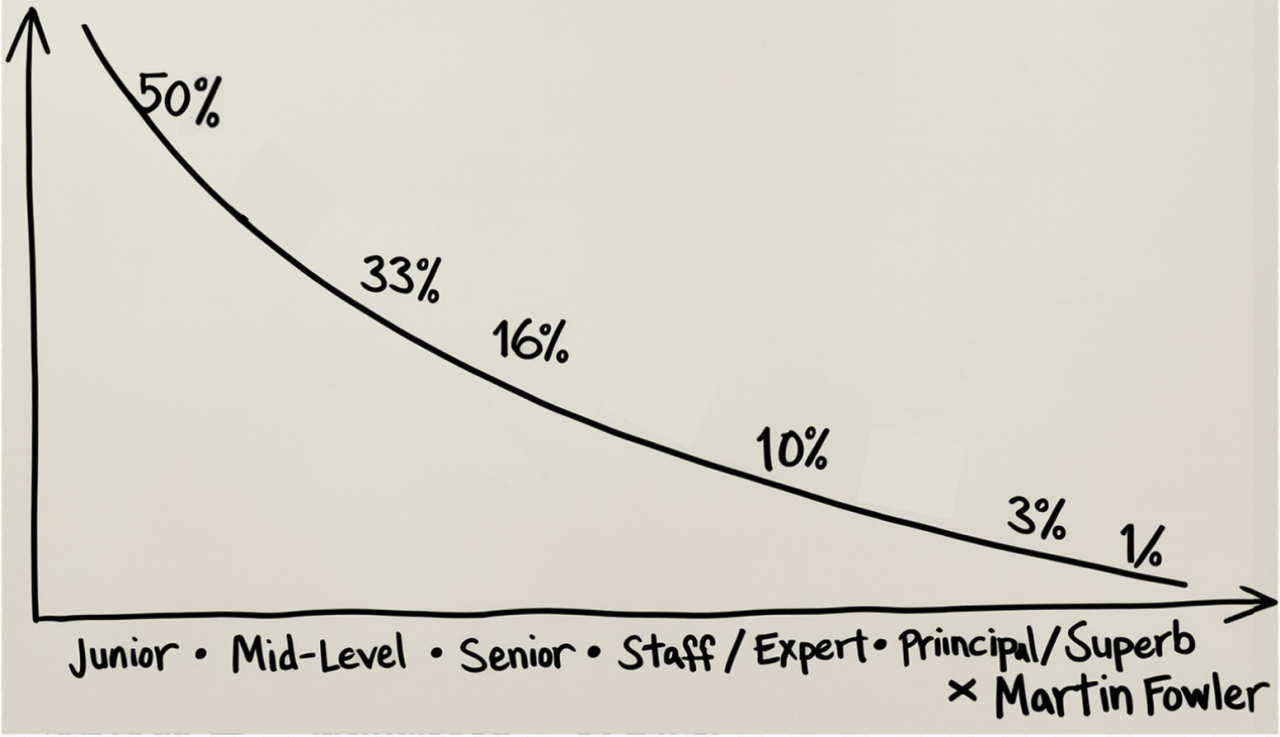
This distribution explains why AI-generated code often looks like mid-junior work: there’s simply more of it to learn from.
So you see – senior and above developers have no chance at generating the amount of code Mid-junior devs generate.
That means, that’s the level one can expect from AI. Not that I’m saying there’s something wrong with Mid-Juniors – it’s just that their code still lacks that of developers with more seniority and expertise.
The Results of AI Tests Generation
What happened when I asked AI to generate tests for my first flutter tutorial led app?
The usecase was a bit more complex – but not by much.
The app was taking “random” text from a WordPair 3rd party library and showed it in the BigCard component. There was also a button that clicking it generated a new random pair of words and replace the old one in the BigCard.
Before going over the solution, I need a moment of honesty from you. Think (or even write down) how you’d test this scenario.
Finished? Let’s see what the AI did.
As we’ve seen, descriptions matter. Here’s what AI produced.
As we already understand, the description tells a lot about the author’s logic, so let’s look at it:
testWidgets(‘should display a WordPair and update on button press’)
In this case, we quite a lot of things – with quite a lot of assumptions. And by “a lot” I mean “a lot relative to how simple the scenario is”. Remember that in real life, we usually develop much more complex scenarios.
What is assumed here?
- That we are using WordPair
- That we display the WordPair
- That we have a (single) button
- That clicking this button updates the text
While limiting us with all this coupling and assumptions, it has a few “gotchas”:
- It describes two scenarios: display and update on button press
- What we should expect (besides a very general display a WordPair mention)
This creates quite a vague description that not only allows for a lot of interpretation, it also hints on a code smell (coupling, remember?)
And how did the AI write the test? Here it is:
<div itemprop="text"
  class="Box-body p-0 blob-wrapper data type-dart  "
  style="overflow: auto" tabindex="0" role="region"
  aria-label="ai_test.dart content, created by YonatanKra on 08:32AM on September 09, 2025."
>
| testWidgets('should display a WordPair and update on button press', (WidgetTester tester) async { | |
| await tester.pumpWidget( | |
| ChangeNotifierProvider( | |
| create: (context) => MyAppState(), | |
| child: MaterialApp(home: MyHomePage()), | |
| ), | |
| ); | |
| // Verify initial WordPair is displayed | |
| expect(find.textContaining('_'), findsOneWidget); | |
| // Tap the 'Next' button | |
| await tester.tap(find.text('Next')); | |
| await tester.pump(); | |
| // Verify the WordPair has changed | |
| expect(find.textContaining('_'), findsOneWidget); | |
| }); |
</div> </div>
<div class="gist-meta">
<a href="https://gist.github.com/YonatanKra/6042e6fecfbb54df7b21e8a655ebe170/raw/d3e411666ae8d476e8fc86fa64c89d757b5db729/ai_test.dart" style="float:right" class="Link--inTextBlock" target="_blank" rel="noopener">view raw</a>
<a href="https://gist.github.com/YonatanKra/6042e6fecfbb54df7b21e8a655ebe170#file-ai_test-dart" class="Link--inTextBlock" target="_blank" rel="noopener">
ai_test.dart
</a>
hosted with ❤ by <a class="Link--inTextBlock" href="https://github.com" target="_blank" rel="noopener">GitHub</a>
</div>
</div>What can we understand from this test?
The first thing that’s prevalent is that it is not following the Arrange-Act-Assert (AAA) pattern. This might be a thing of preference. Do note that it arises from the description having two use cases for a single test block. Even if you do not “believe” in testing principles, it still violates separation of concerns, which is a general software principle.
Looking deeper into the code we see that we expect a single widget to contain an underscore on line 10:
expect(find.textContaining(‘_’), findsOneWidget);
We then tap a button with the text Next, and expect… wait, what? That a single widget contains underscore? You can probably see where this is going…
Now comes the moment of honesty – what test description did you have in mind? Would it have led to the AI generating a similar vague (not to mention useless) test?
AI can generate code, but it cannot design meaningfully. That’s where human judgment is irreplaceable. We are here to make things meaningful.
This is where we – humans – make the difference.
Summary
Meaningful testing isn’t just about verifying functionality—it shapes software architecture and clarity. Humans remain essential to bring intentionality, design thinking, and meaningfulness where AI falls short.
In this article we explored how the way we write tests reflects and influences software design decisions and what to take into account to avoid wrong use of AI in testing.
Even small details in test descriptions (e.g., “should display text” vs. “should display text in a big card”) carry architectural implications such as specificity, coupling, and interface contracts.
Current AI-generated tests often lack meaningful design insight, producing vague or overly coupled tests. AI behaves like a fast, large-scale copy-paster at a mid-junior developer level, but lacks the critical thinking needed for meaningful software – and tests specifically – design.
Can it be different? Yes it can. I actually trained my copilot to write better tests – even TDD. Here’s one of its answers after brainstorming about architecture.

If you’re interested in that experience, do let me know in the comments (or DM) 🙂